Abstract
- Stands for Open Authorization
- Only for Authorisation
- Authorization Server gets Consent from Resource Owner to generate Access Token for Client to access Resource Server with refined permission control
| Without OAuth 2.0 | With OAuth 2.0 | |
|---|---|---|
| Permission control | Sharing your password gives the unlimited access | Scopes limit the Client to only the permissions it requests |
| Attack surface | Stolen password = permanent, full access | Access Tokens expire via TTL, limiting the damage window |
Resource Owner
- The owner of the identity, i.e. the live user themselves
Consent
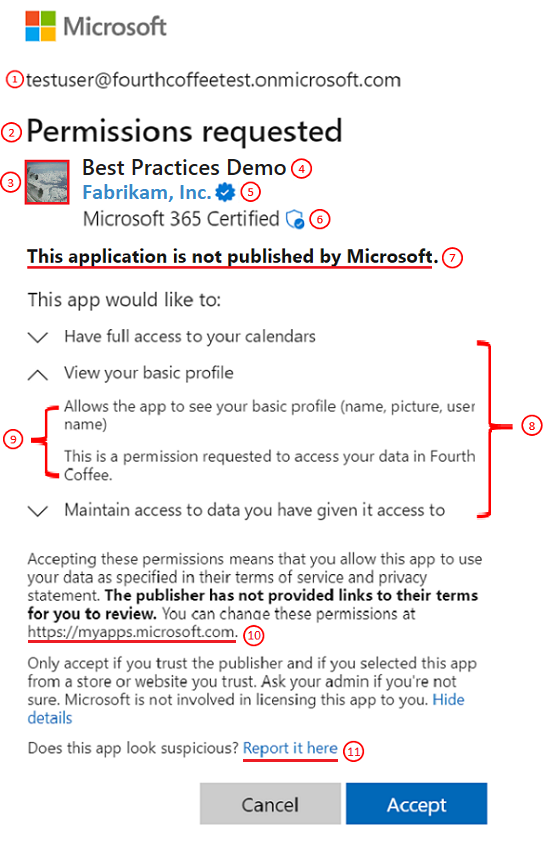
- The Authorization Server shows the requested Scope to the Resource Owner for approval
- The Client initiates this by redirecting the Resource Owner to the consent page, passing its Client ID, Redirect URI, and requested Scope
Microsoft Entra consent prompt example

Managing previously-granted consent
| Provider | Console |
|---|---|
| Microsoft | myapps.microsoft.com |
| myaccount.google.com/connections | |
| GitHub | github.com/settings/applications |
Client
- Third-party application that wants to act on the Resource Owner’s behalf
Scope
- The specific permissions the Client requests, limiting what data and actions it can access on the Resource Server
Client ID
- Public ID used to identify the Client with the Authorization Server
Client Secret
- Shared secret known only to the Client and the Authorization Server, used by the Client to authenticate itself when exchanging an Authorization Code for an Access Token
Access Token
- The Client obtains it by sending its Client ID, Client Secret, and Authorization Code to the Authorization Server
- Used to call the Resource Server on the Resource Owner’s behalf
- Used for Authorisation, NOT Authentication
Authorization Server
- The application that hosts the Resource Owner’s account and acts as the single source of identity
Redirect URI
- Also known as Callback URI. A URL on the Client where the Authorization Server sends the user back after they grant (or deny) consent
Response Type
- The type of information the Client expects to receive. Most commonly Authorization Code
Authorization Code
- Short-lived code the Authorization Server returns to the Client, later exchanged for an Access Token
Resource Server
- The API that the Client wants to call on behalf of the Resource Owner
- Often bundled with the Authorization Server in the same product (e.g. Google runs both)
Login SSO vs Data Integration
- The same Client often hosts two separate OAuth flows with completely different purposes. Both can share the same Client ID and Client Secret, but each must register its own Redirect URI on the Authorization Server
| Login SSO | Data Integration | |
|---|---|---|
| Purpose | Authenticate a user into your app | Access user’s data on the provider’s APIs |
| Scopes | openid, email, profile | Resource-specific (gmail.readonly, calendar.events, …) |
| Result | App issues its own session, often a JWT | App stores access + refresh tokens to call provider APIs |
| Example | ”Sign in with Google” on a login page | A CRM syncing Gmail threads and Calendar events |
Swapping the two redirect URIs silently breaks both flows
If your app’s config accidentally assigns the login redirect URI to the data-integration flow and vice versa, the Authorization Server returns auth codes to the wrong handler. The login handler tries to exchange a code meant for Gmail scopes, the data-integration handler tries to issue a session from a login code, and both produce cryptic errors (often a malformed JWT or “No payload”). See Debugging the No Payload Error for a real-world walkthrough.
Debugging Redirect URI Mismatches
redirect_uri_mismatch(and cousins like malformed JWT / “No payload”) is the most common failure mode in OAuth 2.0 integrations. Checklist below, with example commands from debugging Twenty CRM’s “No Payload” error
1. Verify the Actual Redirect URI at Runtime
- Do not trust config files.
curlthe auth initiation endpoint and inspect whatredirect_uriyour app actually sends to the provider
# Follow the redirect and capture the full URL the provider receives
curl -sk -o /dev/null -w '%{redirect_url}\n' 'https://twenty.nushackers.org/auth/google'- URL-decode the
redirect_uriparameter and compare character-by-character with what is registered in the Authorization Server
# URL-decode to make the comparison easier
python3 -c "from urllib.parse import unquote; print(unquote('PASTE_REDIRECT_URL_HERE'))"2. Check for Config Override Layers
- Many apps have a Configuration Override Chain where database values or admin UI settings silently override environment variables
# Query the database directly to see what the app is actually reading
docker exec -it <db-container> psql -U postgres -d default \
-c "SELECT key, value FROM core.\"keyValuePair\" WHERE key LIKE '%CALLBACK%';"TwentyConfigService Precedence is a concrete example
DB values in
core."keyValuePair"override.envwith no warning. Editing the env file alone will not fix the bug.
3. Match URIs Exactly
- The Redirect URI must match byte-for-byte between the app config and the auth server registration
- Common mismatches: trailing slash,
httpvshttps, port number, path casing,www.prefix
4. Verify the Authorization Server’s Registered URIs
- In Google Cloud Console: APIs & Services > Credentials > OAuth 2.0 Client IDs > Authorized redirect URIs
- The
gcloudCLI cannot read or modify OAuth client redirect URIs, so this must be done in the web console
5. Distinguish Multiple OAuth Clients
- If your infrastructure uses separate OAuth 2.0 clients for different purposes (e.g. one for Traefik forward-auth SSO, another for the app’s own login), ensure each client has the correct redirect URIs for its flow
Swapped credentials
Using the wrong Client ID or Client Secret in the wrong service produces confusing errors. Label your OAuth clients clearly in the provider console (e.g. “Traefik SSO” vs “Twenty CRM Login”).